Executive Summary
The idea of running many AI coding agents at the same time is powerful, but often misunderstood. When people claim they have ten or fifteen agents working in parallel, they rarely mean ten agents editing the same codebase simultaneously. What they usually mean is that they have many independent AI contexts working on different problems, and they orchestrate the results.
True multi-agent coding is possible, but it requires structure. The central constraint is simple: two agents must never modify the same working directory at the same time. Once you respect that rule, several reliable patterns emerge.
This post explains the realistic options for enabling multi-agent development, how they differ, and when each one makes sense. I will focus on practical workflows rather than theory, with concrete examples you can adopt immediately.
What “Multiple Agents” Really Means
The phrase “running multiple agents simultaneously” can describe very different realities.
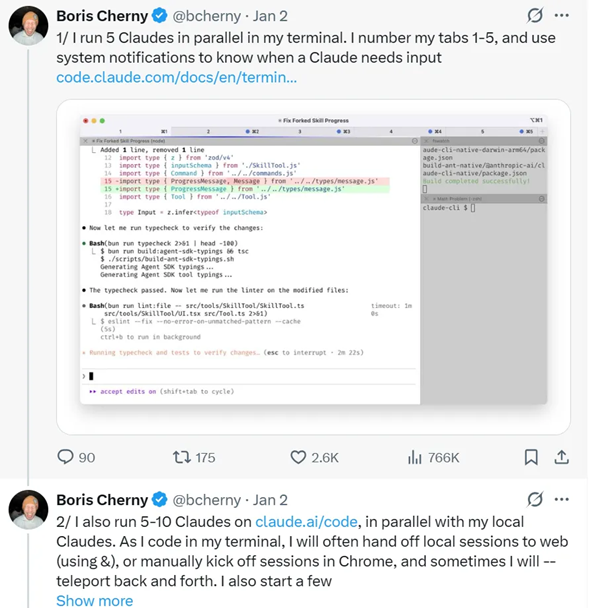
One interpretation is parallel thinking. You might have several Claude Code or Cursor sessions open, each exploring a problem, generating ideas, or proposing patches. Only one of them actually writes code at any given moment. This is concurrency at the level of attention and planning.
Another interpretation is true parallel development. In this model, several agents are actively implementing different features at the same time. That requires isolation, just as a human team would need isolation to avoid stepping on each other’s changes.
The confusion happens when people mix these two meanings. An agent session is just a context. Code changes live in a filesystem. If two agents share a filesystem, they will collide, no matter how many branches exist in git.
Understanding this distinction clarifies everything that follows.
Model 1: Parallel Thinking With Serialized Writing
The simplest way to benefit from multiple agents is to treat them as collaborators who think in parallel but write sequentially.
Imagine you have three tasks:
- Investigate a bug in a payment workflow
- Draft a new API design
- Write tests for an existing module
You can open three AI sessions and assign one task to each. While Agent A analyzes logs, Agent B proposes an API shape, and Agent C generates test cases. You switch between them as they finish.
Only one of them is allowed to apply changes to the repository at a time.
This model requires no special git setup. It is easy to manage, fast for solo work, and avoids merge conflicts entirely. It is also what many public demos of “multi-agent coding” are actually doing.
The limitation is obvious: real development still happens one change at a time. The parallelism is cognitive, not structural.
For many individual developers, this is already a huge productivity boost and may be all they need.
Model 2: True Parallel Development With Branch Isolation
If you want agents to actually build features concurrently, you need the same discipline that a team of human developers would use: separate workspaces.
A common misconception is that branches alone provide isolation. They do not. Branches are simply pointers to commits. The working directory on disk is what agents modify. If two agents operate in the same folder, they will overwrite each other’s files even if they are “on different branches.”
To run multiple agents safely in one repository, you must give each agent its own working directory.
Model 2A: Git Worktrees
Git worktrees are the most elegant solution to this problem. They allow a single repository to have multiple independent checkouts at the same time, each on a different branch.
A practical setup looks like this:
git checkout main
git pull

git branch feature-a
git branch feature-b

git worktree add ../project-a feature-a
git worktree add ../project-b feature-b
You now have two folders, both backed by the same repository, but completely isolated from each other. One agent can work in project-a while another works in project-b. They commit independently, push independently, and merge back to main when ready.
This pattern mirrors how professional software teams operate, except the “developers” happen to be AI agents.
Worktrees are especially effective when features are naturally separable. For example:
- Agent A implements a new authentication flow
- Agent B builds an analytics dashboard
- Agent C refactors a background job system
All of these can progress in parallel without conflict as long as their scopes are clear.
When each agent finishes a milestone, you integrate the branch in the usual way:
git checkout main
git merge feature-a
This is true parallel AI development with minimal overhead.
Model 2B: Multiple Clones
If you prefer simplicity over elegance, you can achieve the same result by cloning the repository multiple times.
gitclone repo-url project-a
gitclone repo-url project-b
Each clone becomes an independent workspace for one agent. The workflow is straightforward and tool-agnostic. The only downside is duplicated disk usage and a bit more manual housekeeping.
Functionally, this is identical to worktrees, just less efficient.
Model 3: Multiple Repositories, One Product
Many systems are already structured as a collection of repositories:
- a frontend application
- a backend service
- infrastructure code
- documentation
- internal tools
In this case, multi-agent development requires no special technique at all. Each agent can own an entire repository. One works on the frontend, another on the backend, another on Terraform, and so on.
This is often the cleanest form of parallelism because the architectural boundaries are already defined.
Model 4: Specialized Role Agents
Another useful pattern is to organize agents by roles instead of by features.
Rather than having three agents each build a feature end-to-end, you might create:
- a test-writing agent
- a refactoring agent
- a documentation agent
- a research agent
These agents operate mostly in analysis and proposal mode. They generate patches and recommendations rather than directly editing files. A human or a coordinating agent reviews and applies their work.
This approach is valuable in complex or sensitive codebases where unrestricted automated changes would be risky.
Patterns That Do Not Work
There are a few approaches that consistently lead to frustration.
Running two agents in the same directory at the same time is the most common failure. No amount of git branching will prevent conflicts if the underlying files are shared.
Allowing multiple agents to commit directly to the main branch is another bad idea. Without isolation, you lose the ability to reason about changes and to roll them back safely.
Finally, continuous cross-rebasing between agents creates churn without real benefit. Integration should happen at logical checkpoints, not as a background activity.
Practical Rules for Success
Regardless of which model you choose, several principles make multi-agent workflows reliable.
Each writing agent must have its own workspace. This is the foundational rule.
Scopes should be explicit. An agent assigned to “work on the billing module” should not be allowed to modify unrelated parts of the system.
Commits should be small and coherent. AI-generated changes are easier to review when they are incremental.
Integration should be deliberate. Rebase or merge when a feature milestone is complete, not on every small change.
And most importantly, humans remain the orchestrators. Agents generate code, but you decide what becomes part of the product.
Choosing the Right Approach
The best model depends on your situation.
If you are working alone and want immediate benefit with minimal setup, start with parallel thinking and serialized writing.
If you are building multiple independent features in a single repository, use git worktrees with one agent per branch.
If your architecture is already split across repositories, assign one agent to each repository.
If you are dealing with a delicate or unfamiliar codebase, consider role-based agents that propose changes rather than apply them.
Closing Thoughts
Multi-agent coding does not require new science. It requires good engineering hygiene.
The same principles that allow human teams to collaborate effectively also enable AI agents to collaborate: isolation, clear ownership, and controlled integration.
Once those are in place, you can scale AI development far beyond what a single agent or a single developer could accomplish.
If you want help designing a concrete setup for your own environment, tell me a few details about your project structure and tooling, and I can suggest a workflow tailored to your case.